Retrospect 8 Beta 2 console log?

Folks,
What do you think this means?
4/30/09 2:12:09 PM com.retrospect.RetroEngine[4723] #3> DLLoadLib: no id resource in \”/Library/Application Support/Retrospect/RetrospectEngine.bundle/Contents/MacOS/libretrores.dylib\”, skipDyloCheck 0x1
4/30/09 2:12:09 PM com.retrospect.RetroEngine[4723] #2> Command line is /Library/Application Support/Retrospect/RetrospectEngine.bundle/Contents/MacOS/RetroEngine
4/30/09 2:12:10 PM com.retrospect.RetroEngine[4723] #1>
4/30/09 2:12:10 PM com.retrospect.RetroEngine[4723] This Retrospect Beta software has expired.
4/30/09 2:12:10 PM com.retrospect.RetroEngine[4723] For information, please contact:
4/30/09 2:12:10 PM com.retrospect.RetroEngine[4723] EMC Corporation
4/30/09 2:12:10 PM com.retrospect.RetroEngine[4723] Pleasanton, CA
4/30/09 2:12:10 PM com.retrospect.RetroEngine[4723] 925.600.5305 * beta@emc.com
4/30/09 2:12:12 PM com.apple.launchd[1] (com.retrospect.RetroEngine[4723]) Exited with exit code: 79
How about having this splattered across my console log, almost non-stop?
I\’d called it a good example of a disk space hog, and a bad example of how to write auto-expiring software.
Yes, I know that the Beta expired, but I didn\’t realize it was going to keep writing that to my console log, without end… If it was going to do that, why didn\’t they add a GUI notice of some sort?
Something along the lines of:

Retrospect 8 Beta 2\’s trial has expired, the Retrospect Engine has been turned off. Would you like to check for an update?

The problem is that engine would shutdown since it realized the trial expired, but EMC did not remove the LaunchD agent which is configured to automatically restart the engine IMMEDIATELY if it quits.
Absolutely genius… I can see that they don\’t write trial based demo\’s often…
Getting to know your Mac: Grab

MacFixit has a tutorial on using Grab…The Built-in Screen Capture tool for the Macintosh.

Getting to know your Mac: Grab: \”In this installation of Getting to know your Mac, MacFixIt editors will take a look at a little utility called Grab. Grab lets you take screenshots of your Mac in a variety of different ways. This can be helpful if you are a blogger doing a tutorial or need to show someone an issue you are having for troubleshooting purposes.\”

(View the rest of the article at Getting to know your Mac: Grab)

18 cool sites and apps that teach you about space

Few topics interest me more than space. Though I\’ll admit that I don\’t know nearly as much as I would like, it has always been my goal to learn about the universe. I bet I\’m not alone. That\’s why I\’m sharing this list of 18 space sites. They all offer something neat. And they\’re all informative.\”

(View the rest of the article at 18 cool sites and apps that teach you about space)

How to turn on & Off Time Machine from the terminal

Well, I am working on testing a scheme to only allow Time Machine to run when the user is local to the Time Capsule…
Through some research, you can turn on and off Time Machine from the command line…
Turn On - defaults write /Library/Preferences/com.apple.timemachine AutoBackup -boolean true
Turn Off - defaults write /Library/Preferences/com.apple.timemachine AutoBackup -boolean false
Quick & Easy to run from the command line…

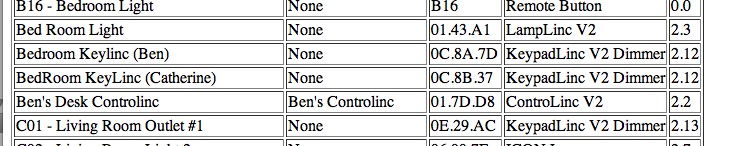
Indigo 4.0.1 Released

Indigo 4.0.1 is now available for download.

IMPORTANT: For iPhone support this version requires Indigo Touch 1.0.1 or higher (Touch 1.0.0 will not be able to connect) which can be downloaded from the Apple iTunes App Store.

In addition to the major 4.0 features and improvements, this update includes:

  • Added support for INSTEON SwitchLinc 220V Relay.
  • Fixed Indigo client-only crash that could occur when clicking on Variable popup controls if values were being updated via AppleScript.
  • Fixed small bug that prevented sprinklerMultiplier variable from automatically being selected in the Actions panel in some cases.
  • Fixed UI bug which incorrectly showed UI controls when a stateless Device (RemoteLinc, ControLinc, etc.) was selected.

\”

(See the Rest of the Story at Perceptive Automation – Indigo 4.0.1 Released.)

It\’s the small things, that make the Macintosh great…

How many times have you sat down to login to your computer, and you can\’t login? You know your using the right password, but it isn\’t working… Then of course, you have to pull out your password cheat sheet, but you know what, you are using the right password…
What happened? What broke?
Did you check the caps lock key? Oh, that was easy…
When your text cursor is in a password field, if the caps lock is on, you will see an arrow like shape, on the right side of the field…
\"Picture
If the caps lock key is off, you simply won\’t see it…
\"Picture
It\’s quick, easy, and simple to observer, and remember…
Windows does have something similar, a small \”speech\” bubble will show saying that \”Your Caps Lock key is on, blah blah blah blah\”… Useful, except as soon as you move your mouse, or touch a key on the keyboard, it disappears…

What Exchange 2010 means for Mac users | Business Center | Macworld

What Exchange 2010 means for Mac users | Business Center | Macworld: \”What Exchange 2010 means for Mac users
Microsoft has big changes planned for its flagship communications server—here’s how it affects you
For most Mac users, the phrase Exchange Server has been the cause of a great deal of annoyance and frustration. From bizarro ways of encoding rich text e-mail, (winmail.dat, anyone?) to a host of features that were forever out of reach unless you were on Windows using the most current version of Outlook, being a Mac user in an Exchange world meant you were sitting at the kid’s table in the kitchen, staring longingly at the adults having a good time.\”

(View the rest of the article at MAcWorld – What Exchange 2010 means for Mac users)