Sometimes the more educated you are, the easier you are to fool. Â James Randi has been encouraging critical thinking for years, and his foundation continues his legacy…
Will the End of Time Part 2 Carry the show?
Well, the End of Time Part 1 is done, and in just under a week, part 2 will be shown. Â And again, the ending of the episode was extremely poor.
Russell T. Davies, yet again had overall a good episode, which tripped over it\’s own feet at the end. Â His biggest issue seems to be the old, \”What do I do next\”? syndrome.
He seems to be unable to deal with the Plot Leveling & one-uping the story. Â If your not familiar with those TV Tropes, then let me explain. Â The problem with a continuing series is that after the hero solving the problem, what does he do next? Â Go to disneyland? Â No, typically there is another adventure. Â Well, it can\’t be easier than the previous adventure, right? Â Why not? Â Because it\’s not a challenge, and the viewer\’s know that.
So, the \”Big Bad\” must be bigger, badder, and more evil. Â So, if handled poorly, you get into a \”Big Bad\” evil race. Â The hero must be able to solve the problem, so he either get\’s a new device to solve the problem, or the big bad get\’s weaker, in a never ending cycle. Â At least until the next big bad shows up.
I believe that RTD hasn\’t been able to solve this issue, or is uncomfortable with this genre problem. Â He seems to be much more comfortable with drama, compared to hero dramas.
So this is part of why the season finale\’s, typically seem to be magically solved at the end…. Â Even Deus Ex Machina\’d.
Hopefully RTD will pull a rabbit out of the hat, but this feels like he was sitting down and had this type of conversation with himself:
- Well, I need something really a \”Big Bad\” for Tennant\’s last episodes
- Oh, well I wanted to bring the Master back. Â He\’s really a big bad…
- But, he\’s already been defeated…. Â How can I make it him more dangerous.
- What if there are more than one?
- Yesssss… Â Oh what if everyone was the Master?
- Now how do I do it?
How could this have been handled better? Â Well, if the Master spent more than 5 minutes at the computer, and there was some sign of struggle with programming this, it might have worked better. Â After all, what medical device is designed to \”destroy\” the patient? Â And how the heck is the Doctor suppose to be able to save everyone?
If the special effect\’s for the transformations were something other than Linda Blair\’s head turning session sped up 100 times, than maybe it would of went over better.
And did the Master even think any of this over? Â He\’s going to rule over himself? Â So Clone #101 – 250 are going to be comfortable going to work on the farm so that he doesn\’t starve? Â They are him, they\’ll never be accepting of that role. Â It\’s not like he has a TARDIS to escape the earth with.
I am looking forward to Steven Moffat taking over, hopefully the scripts will be much more consistent, and handle this sort of thing better.
All I want for Christmas, is an Alien…
Don\’t send Command-Tab, etc. in ARD and screen sharing – Mac OS X Hints
In Apple Remote Desktop 3.3, Apple changed the behavior of key commands during screen sharing. In this knowledge-base article, one of the listed \”improvements\” is this:
When controlling a remote client, function keys and key combinations for actions such as Force Quit, Log Out, and the Application Switcher are now all sent to the remote computer.
While this feature has its benefits in some scenarios, some people may prefer the old functionality. Here\’s how to make Remote Desktop not send the special function keys to the remote computer. Quit Remote Desktop, then open Terminal and enter this command:
defaults write com.apple.RemoteDesktop DoNotSendSystemKeys -bool YES
If you decide you want to have the special function keys sent to the remote machine, just quit Remote Desktop and repeat the above command, but change YES to NO.
Why is USB slower than Firewire?
Take this quote from Macworld:
When we connected the MacBook Pro to a 2TB Western Digital My Book Studio drive and copied a 1GB file to it from the internal hard drive, we found that it took 23 percent less time over FireWire 400 than over USB 2.0. Duplicating that file using FireWire 400 on the WD drive took 10 percent less time than when run over USB 2.0. To see how the different connections performed in more typical backup tasks, we copied over a 2.5GB folder containing 5000 individual files and folders. In that test, we found the FireWire 400 transfer to be 26 percent faster than USB 2.0. Using AJA’s System Test application, we found the MacBook Pro’s FireWire 400 connection to be 46 percent faster than USB in the writing tests. In the reading tests, however, the edge went to USB, which was nine percent faster than FireWire 400.
But this doesn\’t make sense, does it?
USB 1, is primarily aimed at keyboards, joysticks, and other low speed transfers, after all, it is limited to 12 Mbit/s.
USB 2, upgrades the transfer rate to a peak of 480 Mbit/s, and is quite useful for large file transfers (eg, Hard Drives, Optical drives, etc…).
USB 3, is not yet finalized, and while on paper it will be significantly faster than USB 2, it is not yet ready for mainstream use.
Firewire 400, can transfer data at 100,l 200 or 400 Mbit/s half-duplex (12, 24, or 49 megabytes/second).
Firewire 800, allows a transfer rate of 786 Mbit/s full-duplex, and is backward compatible to Firewire 400.
In addition, there is a S1600, S3200, S800T, and (unreleased at this point) P1394d for the firewire family, each of these are significantly faster, but may require different cables (eg Fiber).
So why is Firewire 400 (400 Mbit/s) faster than USB (480 Mbit/s)?
Sadly, it is due to hardware limitations.
- USB relies on the host-processor to manage low-level communications, where Firewire delegates the low-level communications to the Firewire devices themselves. Â This means less or no CPU usage during data transfers.
- Being host based, USB requires every packet to be processed by the CPU. Â This copying a file from one USB drive, to another, requires the file to be \”sent\” to the CPU, and then back to the other drive. Â Thus taking roughly 2x bandwidth, in comparison to the Firewire drive(s).
- USB is based on a tiered-star topology, which may require multiple devices to pass communications along thus reducing the available bandwidth between the devices communicating.
- USB 1.x, and 2 can not directly communicate with the CPU, the CPU must poll the devices. Â This means that the data transfers can not occur until the CPU polls the device again.
- USB typically only have a single single USB controller, which means the bandwidth is divided between the ports (eg 480 Mbit/s / 4 ports = 120 Mbit/s per port). Â Some motherboards do have multiple controllers, but even then there are typically only 2 controllers, for 6 or 8 USB ports.
- In most cases these controllers are connected to the Southbridge, which is typically limited to 120 or 180 MB/s.
- The 480Mbit/s measurement is of Peak performance (eg Burst rate), where Firewire\’s speed is sustained. Â So while USB is faster, it can not sustain that rate.
Overall, both USB and Firewire have a high rate of speed for data transfers, but Firewire currently has a slight edge. Â Will this difference in speed matter for most people, not necessarily, but for any time intensive data transfer Firewire will be faster. Â At least until USB 3 is released, and even then Firewire 1600 or 3200 would be faster, and they are already on the market…
A brief guide to DNA Sequencing
Understanding technology shouldn\’t be limited to processors and memory. Developments in DNA sequencing are already changing the face of medicine, and the pace of technology development in the field is staggering. Read on to understand the basics of DNA sequencing.
It\’s cool. That\’s it, go home.
Okay, follow this link to the full article…
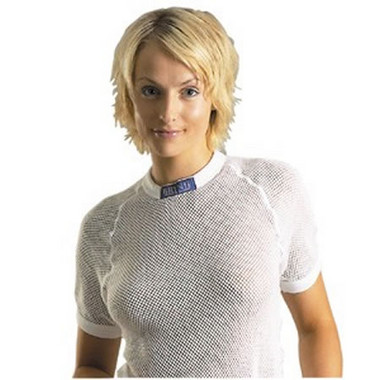
Nihon Uni shirts resist stabbing

Mind you, this isn\’t the first time we\’ve seen garb constructed to withstand vicious knife fights, and apparently a few Japanese streets are becoming just as frightening as some in London. Reportedly created to provide protection against stabbers following an \”increasing number of malicious crimes that have victimized children and late-night convenience store clerks,\” Nihon Uni has developed a t-shirt crafted from \”ultrahigh molecular weight polyethylene fiber.\” Aside from rendering blades useless, the material is also completely machine washable and lightweight; still, the fabric can be penetrated by \”sharp points,\” so it\’s up to you to steer clear of rooftop archers. Nevertheless, long-sleeved versions can be had this June for ¥22,000 ($221) to ¥59,000 ($593), while the way less protective short-sleeved variety will run you between ¥19,000 ($191) and ¥52,000 ($522).
EarthMate? I just want a friend…(Emul.kext)
Sorry, couldn\’t resist the bad joke….
But what is \”EMUL.Kext\”? Â It\’s in the extensions directory, and I can\’t place it…
Well, the only references I can find to this is EMUL.Kext, appears to be part of the EarthMate Userland Library.  The EarthMate User Library provides access to the usb device via libusb and POSIX threads. Target operating systems include Mac OS X, BSD, and Linux. (via BerliOS Developer: Project Summary – EarthMate Userland Library).
Now in English, this allows the Earthlink GPS devices, to be seen by the Macintosh, Linux, and BSD based OSes. Â Presumably for GPS devices, or to allow the GPS to be updated using EarthMate\’s updaters.