Scott Pilgrim vs. The World?
While I haven\’t seen nor read Scott Pilgrim vs. the World….  The trailer certainly makes it into one of the movies I want to see….  There are two fun movies I can’t wait to see! Kick-Ass is one of them. Scott Pilgrim vs. the World is the other!
Meet charming and jobless Scott Pilgrim (Michael Cera). A bass guitarist for garage band Sex Bob—omb, the 22—year—old has just met the girl of his dreams…literally. The only catch to winning Ramona Flowers (Mary Elizabeth Winstead)? Her seven evil exes are coming to kill him. Genre—smashing filmmaker Edgar Wright (Hot Fuzz, Shaun of the Dead) tells the amazing story of one romantic slacker’s quest to power up with love in Scott Pilgrim vs. the World. Scott Pilgrim has never had a problem getting a girlfriend. It’s getting rid of them that proves difficult. From the girl who kicked his heart’s ass—and now is back in town—to the teenage distraction he’s trying to shake when Ramona rollerblades into his world, love hasn’t been easy. He soon discovers, however, his new crush has the most unusual baggage of all: a nefarious league of exes controls her love life and will do whatever it takes to eliminate him as a suitor. As Scott gets closer to Ramona, he must face an increasingly vicious rogues’ gallery from her past—from infamous skateboarders to vegan rock stars and fearsome identical twins. And if he hopes to win his true love, he must vanquish them all before it really is game over.
HERE is the new trailer for Scott Pilgrim vs. the World!
An epic of epic epicness!
Gonna be an excellent summer for movies!
MARK GATISS in \”The First Men In The Moon\”
The BBC have announced details of a new production of the HG Wells classic, The First Men In The Moon. Starring Doctor Who writer/actor and all~round legend, MARK GATISS, this show will broadcast on BBC Four later in the Spring/Summer season. See a clip of it in the player below.
Christopher Eccleston IS John Lennon
It is so scary at how well Christopher Eccleston looks just like John Lennon!!!
In Lennon Naked, Christopher Eccleston plays John Lennon in a single film charting his transition from Beatle John to enduring and enigmatic icon. BBC Four will screen this later in their Spring/Summer season – see a clip in the player below. It also sees Eccleston teaming up with Naoko Mori (Toshiko, from Torchwood) again after their appearance together in Doctor Who in 2005.
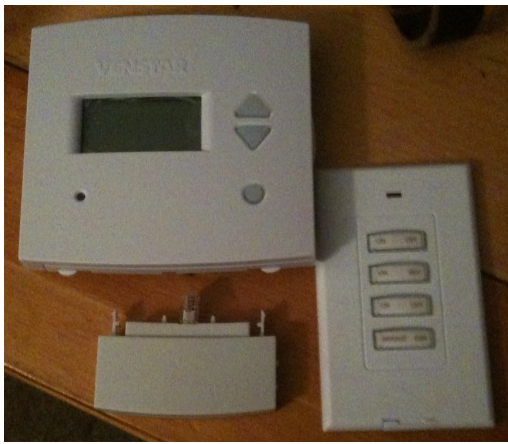
Venstar T1800, a Review…
For years, I have considered purchasing a new thermostat, so that I could integrate it into the Home Automation, and control it, easily.. Â So I have kept my eye on a few different solutions, but just recently, we needed some furnace work, and I was able to justify purchasing a new Venstar T1800, when I had the repairs done… First, the Venstar\’s are not that expensive, but if you are going to use it with an Insteon based Home Automation system, look for the Venstar Thermostat & Venstar Insteon Adapter bundle. Â You\’ll save a few dollars that way, and it\’s noticeable… Second, the product is nice, while it doesn\’t have all buttons, slide switches, and other whistles my old thermostat had… Â It works pretty darn well, and is pretty pleasing to set up. The thermostat supports dual fuel, multiple stage heat & cooling, and a variety of other features. Â It supports \”fuzzy logic\” with heating and cooling, so if configured, it will attempt to have the house reach the temperature you request at the time you have programmed… Â So in other words, it will turn on before your 6am scheduled time, so that the temperature will be \”right\” at 6am. Â All this, and more… The size is right to, it\’s slightly smaller than my old thermostat… Â Here\’s a comparison with a X10 3 button keypad, you can also see the Insteon Adapter at the bottom:  The advertised features for the T1800 are:
- 7-day Programmable with up to 4 time periods per day, with copy command for easy programming
- Accepts humidification/dehumidification control module (Venstar part number ACC0430)
- Auto changeover, 3-stage heat, 2-stage cool for use with gas/electric, heat pump, electric & hydronic heat
- Configurable for manual changeover, also configurable programmable or non-programmable
- Adjustable deadbands and timers
- Control to, or monitor a second remote sensor
- 3 configurable outputs for maximum flexibility (MISC1, MISC2, MISC3)
- Extra 6th and 7th outputs (beyond our standard thermostat)
- Programmable Fan- adjustable 0 to 60 minutes each hour, with programmable start and stop times
- Smart recovery
- Display shows both heating a cooling set points and room temperature simultaneously
- All programming and set points stored in non-volatile memory, and are never lost in power failure
- Service UV lamp indicators
- Configurable programmable or non-programmable, also configurable for manual changeover
- Red/Green LED shows whether thermostat is calling for heating or cooling
- 5-minute compressor time guard and adjustable cycle limit, both defeatable for servicing equipment
- Outdoor sensor ready with high and low temperature of the day (wired or wireless)
- Thermoglow backlit electro-luminous display and backlit color coded keys and legends
- Accepts accessory IR Remote Control system (Venstar part number ACC0431)
- Accepts accessory EZ Programmer (Venstar part number ACC0432)
The best praise I can give this is that we haven\’t really noticed a significant difference between the Venstar & our older thermostat at this point. Â Well, other than being able to reprogram the thermostat from the other side of the house, that is…. If you would like to explore the unit\’s features, and see how it operates, there is a simulator of the T1900 here… The Rev 2 Insteon adapter allows, access to:
- Cool Set Points
- Heat Set Point
- Mode Status Request
- Temperature Status Request (eg, the Temperature Readings from the Thermostat)
- Humidity Status Request, assuming you have the Humidity Sensor
- Fan Status Request, when in Automatic mode (After all, if it\’s at ON, you know it\’s running)
- Mode Control  (Heat, Cool, Auto, Off)
- Fan Control – Turning the Fan on, or switching to Auto
- Degree Format (F/C)
Pros:
- Can Integrate into an Insteon Home Automation Network (via the Insteon Adapter)
- Relatively easy front panel interface
- Indigo has built-in support for the Insteon Adapter
- Easy indicator showing if a heating/cooling cycle is actually active
- parasitic Power from the Furnace, so no batteries. Â All data is stored in NVRAM, so no need to reprogram if there is a loss of power. Â The Accessory port (eg. Insteon Adapter) also is parasitic, and requires no additional power.
Cons:
- Insteon Adapter (as well as phone adapter, etc) are add-on products
- Only one add-on product can be used at a time (eg. You can\’t tie into an Insteon network, as well as the Phone system, directly..)
- Unable to set the clock or built-in programming from the Insteon Adapter… Â (It seems to be a glaring obvious overlooked feature, but without adding new Insteon protocols, I don\’t see how they could have done it…)
- Requires 6 wire running from Thermostat to Furnace (Technically 5 wire), it uses the common to supply power to the thermostat. Â You can either run the additional wire, or use the 4 wire adapter…
Executive Summary:
Excellent Thermostat, and ties in easily to the Insteon network. Â Well worth the cost, and effort. Â It is more expensive than a stand-alone thermostat, but of course, your paying for the expandability.
Next Steps:
I am currently using the NOAA Weather script for Indigo, and I plan to devise some logic to allow the script to turn down or turn up the thermostat taking into account the weather forecast for the day. Â I am also looking at adding some code to be able to display the heating and cooling readings from the thermostat.
Doctor Who – S5E02 – The Beast Below – episode synopsis
The BBC have issued the synopsis for the second episode of the new series, The Beast Below. Here\’s what they say about the story due for broadcast on April 10:
The Doctor takes Amy to the distant future, where she finds Britain in space. Starship UK houses the future of the British people, as they search the stars for a new home. But as Amy explores, she encounters the terrifying Smilers and learns a deadly truth inside the Voting Booth.
The Doctor is played by Matt Smith and Amy Pond by Karen Gillan.
Episode two is written by Steven Moffat.\”
Indigo Automatic Polling??
Overall, I love Indigo. But one thing that is very annoying and doesn\’t seem to be built in, is the ability to poll all devices on a regular scheduled basis (ie: every 5 mins, 10 mins, etc.) of the status of my devices. This mainly causes a problem when accessing my system via my iPhone. When I connect, the status of my devices is more often then not, incorrect and showing things that are on when I know they\’re off, or showing something at 20% dim when I know it\’s 80% etc. and there is no way to request a refresh.
So what I want (need) to do is be able to regularly poll my devices so that their status is accurate and kept updated.
Does anyone know of an AppleScript or other way to easily do this?
Well, yes… Â There are quite a few different ways… Â But the simplest way to do this is this applescript…
tell application \”IndigoServer\”
with timeout of 60 seconds
try
repeat with curDevice in devices
status request (curDevice)
delay 0.75
end repeat
end try
end timeout
end tell
The delay statement may not completely be necessary, but I found during testing that if there wasn\'t a delay, that the requests would backlog and it would take a few moments for everything to clear out...
But this was originally written with a 2414U, and I haven\’t retested this with a 2412U/2413U. Â The 2412U & 2413U both should allow a reduction in the delay…
Update — I just tested with my 2413U… Â I was able to reduce the delay to 0.15 without seeing a significant backlog in requests developing. Â Changing to 0.10 showed a significant backlog if any device had any delay in responding (ie was more than a 2 hops away).
The Tardis!
BBC America is starting to post some interesting clips from Series 5 (2010) of Doctor Who…
Here\’s one discussing the Tardis! (Roughly 1 min)